Design
Implementation
Toast - Design
Toast is a component used to display system messages to a user.
Live Demo
An warning/error 1 has occured.
Usage
Toast should be used to display system messages, such as a warning or an error.
Anatomy
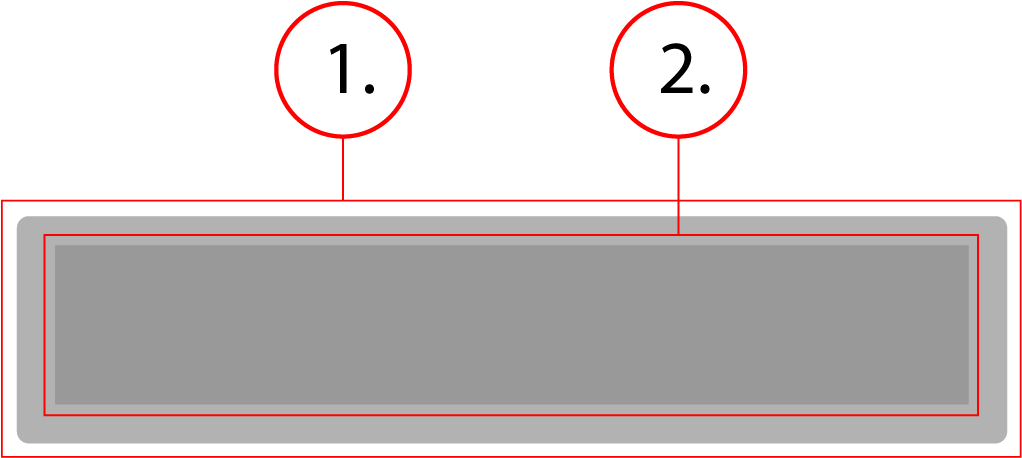
2. Message Text
Behavior
Toast is a fixed element that sits just off the bottom of the screen until prompted by the system to display a message or warning. The container stretches horizontally to fit its message.
Toast - Implementation
Toast is a component used to display system messages to a user.
Basic Toast
This is what a toast component implementation would look like. Below is the HTML, CSS, and JS needed for this component to function. As well as an example of what it would produce.
<div role="dialog" id="toast-1" class="toast" tabindex="-1" aria-modal="true" aria-label=" An warning/error has occured." class:toast--open={active}>
    An warning/error 1 has occured.
</div>

<script>
// es6 toast class
class Toast {
  constructor(opts) {
    //checks that the paramters passed to this is an object
    if (typeof opts !== 'object') {
      throw Error('Toast component requires an object to be initiated.');
    }
    console.log('object passed to Toast',opts);
    this.$el = opts.el;
    this.$disclosure = opts.disclosure;
    this.timer = null;
    //gives timer a default value of 5 seconds if a value is not passed
    this.timeout = opts.timeout || 5000;
    this.onAfterClose = opts.onAfterClose;


    this.open = this.open.bind(this);
    this.close = this.close.bind(this);

    //If disclosure exists then the event listener is attached
    this.$disclosure && this.$disclosure.addEventListener('click', this.open, false);
  }

  //this function makes the toast visible
  open() {
    //exits if another toast is still open
    if (!permissionToToast) return;

    //temporarily blocks any other toasts from opening
    window.permissionToToast = false;
    //sets attributes to visible
    this.$disclosure && this.$disclosure.setAttribute('aria-expanded', true);
    this.$el.classList.add('toast--open');

    this.timer = window.setTimeout(() => {
      this.close();
    }, this.timeout);
  }

  //this function makes the toast hidden
  close() {
    //sets attributes to hidden
    this.$disclosure && this.$disclosure.setAttribute('aria-expanded', false);
    this.$el.classList.remove('toast--open');
    //allows other toasts to be opened
    window.permissionToToast = true;
    this.onAfterClose();
  }
}

//creates arrays to contain the html elements for the toasts and toast disclosures
//***The aforementioned elements must be named in order or they will not display correctly***
const $$toastDisclosures = Array.from(document.querySelectorAll('[id*="toast-disclosure-"'));
const $$toasts = Array.from(document.querySelectorAll('.toast'));
window.toasts = [];
//used to only permit one toast at a time
window.permissionToToast = true;

const funcs = [() => console.log('after close 1'), ()=> console.log('after close 2')];

//Creates a toast object for each element in the toastdisclosures and toasts arrays
$$toastDisclosures.forEach((disclosure, i) => {
  window.toasts.push(new Toast({
    el: $$toasts[i],
    disclosure,
    onAfterClose: funcs[i]
  }));
});
</script>
An warning/error 1 has occured.
.toast {
    position: fixed;
    border-radius: 4px;
    color: #fff;
    background-color: #000;
    font-family: -apple-system, BlinkMacSystemFont, "Segoe UI", Roboto, Helvetica, Arial, sans-serif, "Apple Color Emoji", "Segoe UI Emoji", "Segoe UI Symbol";
    font-size: .875rem;
    font-weight: 400;
    height: 64px;
    bottom: 8px;
    padding: 8px;
    left: 8px;
    display: flex;
    align-items: center;
    flex-flow: row nowrap;
    transform: translate3d(0, 72px, 0);
    transition: transform .3s ease-in-out;
    will-change: transform;
    pointer-events: none;
    z-index: 10;
}
.toast.toast--open {
    transform: translate3d(0, 0, 0);
}
Contents